WildObserve™
The smarter way to work through camera-trap images.
Start labeling. WildObserve™ learns as you go and pre-labels your images.
Free for Mac, Windows, and Linux. Your images stay on your computer.
Watch it in actionBuilt for biologists
Your work teaches the model on YOUR computer.
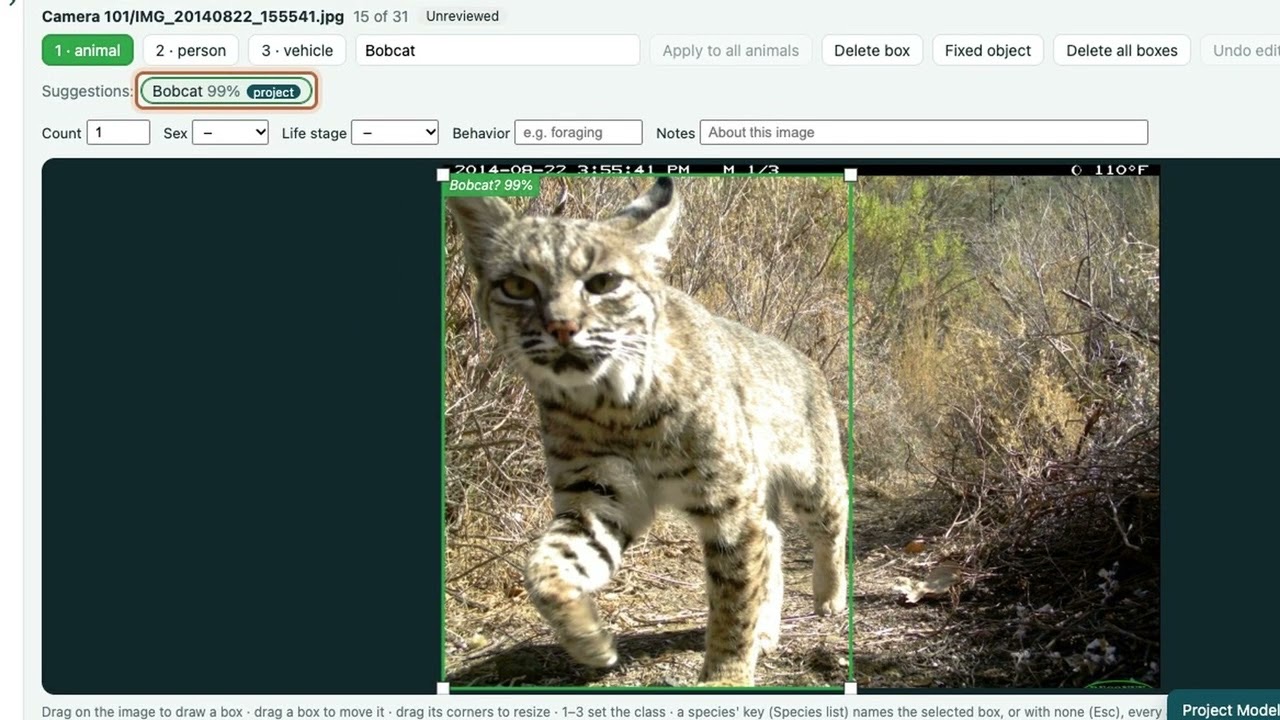
Draw boxes and label animals. As you work, WildObserve™ learns from every annotation and carries that knowledge through the rest of your dataset. New images arrive pre-labeled; check the results and make corrections when needed.
Continuous model improvement
Bring your field knowledge to the first images. WildObserve™ learns from your annotations.
Images remain private
Images and their metadata don't leave your computer.
Get started
Download WildObserve™
Choose your operating system to get WildObserve™ running on your computer.
What WildObserve™ does
Turn camera-trap folders into data ready for analysis.
WildObserve™ is a desktop app that turns folders of camera-trap images into reviewed data that's ready for analysis.
-
Finds what’s in each image
Using MegaDetector, it marks animals, people, and vehicles, and flags images that look empty.
-
Suggests the species
Suggestions start from SpeciesNet and get better as your Project Model learns from your labels.
-
Makes review fast
Images are grouped into capture events, so you can name a whole sequence at once. You can filter by site, camera, date, or species, and record counts, sex, life stage, and behavior.
-
Estimates occupancy and abundance
From your reviewed images, it estimates site occupancy while accounting for detection probability. It can use site covariates you import, estimates their effects on occupancy and detection, and draws the results as plots you can save.
-
Tells you which images to review
You don't need to review every image to estimate occupancy. WildObserve™ picks two capture events per camera, then the most confident suggestion for each species, site, and week not yet confirmed, and tells you when you've reviewed enough. Reviewing about 20% of your images this way gives occupancy estimates nearly the same as reviewing all of them (Tabak 2026, EcoEvoRxiv).
-
Watches for new images
Point it at a folder and it processes new images as they arrive. It can also send email alerts when a species you care about shows up.
-
Exports your data
It exports to CSV, Camtrap DP, Wildlife Insights, COCO, YOLO, and MegaDetector formats.
The methods and tests behind WildObserve™ are described in two preprints: WildObserve: Camera-trap software that learns species labels during review and estimates occupancy and abundance (Tabak 2026, bioRxiv) and Which camera-trap images to review? Estimating occupancy from a small part of a survey (Tabak 2026, EcoEvoRxiv).
Watch it in action
Review images while your Project Model learns.
2:18. More short videos are in the user guide.
FAQ
Frequently asked questions
Is WildObserve™ free?
Yes. The Community plan is free for non-commercial use. It includes AI-assisted labeling and review, occupancy and abundance estimates, export, unlimited image processing, and a Project Model in up to 3 projects. Paid annual plans add Project Models in any number of projects, work across several computers, and commercial use. See Plans.
Do my images leave my computer?
No. WildObserve™ processes everything on your computer. Your images, their metadata, and your annotations stay there, and we never receive them. The app goes online only to check for updates, activate a license, sign you in with Google if you choose to, and send email alerts if you turn them on. See the Privacy Policy.
What computers does it run on?
Macs with Apple silicon (M1 or later) and macOS 14 or later; Windows 10 or later, from the Microsoft Store; and Linux (Ubuntu 22.04 or later, on a 64-bit Intel or AMD processor). Every plan processes any number of images; how fast depends on your computer.
Do I need to write code, or have a graphics card (GPU)?
No. WildObserve™ is a desktop app, so there's no code to write, and it doesn't need a separate graphics card: in tests, it processed 8.1 images a second on an Apple M1 Pro laptop (Tabak 2026, bioRxiv). On Linux, it uses an NVIDIA graphics card if one is set up, and the processor otherwise.
What species can it identify?
Any species you label. After MegaDetector finds the animals, species suggestions start from SpeciesNet, a general species model from Google. Your Project Model then learns your project's own species, and the names you use, as you label them, including species SpeciesNet doesn't know.
How accurate are the species suggestions?
It depends on your images, and the suggestions improve as you review. On a dataset released after SpeciesNet was trained, the Project Model passed SpeciesNet's accuracy with ten labels per species (balanced accuracy 0.783 against 0.751; Tabak 2026, bioRxiv). In the app, Project > Models… shows how well each version of your Project Model did on labels held out from its training.
How is it different from running MegaDetector and SpeciesNet myself?
WildObserve™ runs both for you, with no code, and adds what comes after: a review screen that groups images into capture events, a Project Model that learns your species as you review, occupancy and abundance estimates, and exports in the formats you need. See how it compares with other camera-trap software.
Can it estimate occupancy and abundance?
Yes, on every plan. From your reviewed images, it estimates each species' occupancy, allowing for missed detections, and its abundance with the Royle–Nichols model, with site covariates, plots, and tables and a script for R. Its For occupancy list picks which images to review: reviewing about 20% of them this way gives occupancy estimates nearly the same as reviewing all of them (Tabak 2026, EcoEvoRxiv). See the user guide.
What formats can I export?
CSV (for Excel, R, or Python), Camtrap DP (for GBIF), Wildlife Insights bulk upload, COCO and COCO Camera Traps, YOLO, MegaDetector results, occupancy tables for R, and JSON with full provenance: what the models suggested beside what reviewers saved.
Does it work offline?
Yes. Everything works offline except checking for updates, activating a license, Sign in with Google, and email alerts. A computer that can't go online can use a license file instead, and if you sign in with Google, you can set a password to sign in without the internet.
Can several people review the same project?
Yes. On every plan, each person who reviews on a computer gets their own account, and every record says who confirmed it. With a Lab or Organization plan, projects can also be shared across computers.
Want to turn Camera Trap images into data?
Tell us about your project and we’ll help you get started.
Contact Us